Facebook Like Box is very useful widget to show visitors the authority
and love of the people for his blog. Facebook offers a simple Like Box
plugin that you can easily integrate into your website But the default
Facebook like box is not having good look at ugly all. This tutorial
will show you How To Add Cute Custom Facebook Like Box using CSS To
Blogger. Facebook Like Box is the best way to get more fans on Facebook.
A Fan Box allows great attract your Blog more visitors or readers to
like your Facebook fan page not leaving the like go here. you don't need
to do any think you only need to copy and paste the code. Im Sure that
this Cool Customize Facebook Like Box With CSS widget attracts your
facebook fans increase the count of Likes.
How To Add a Custom Facebook Like Box to Your Site
Now let's start adding it...
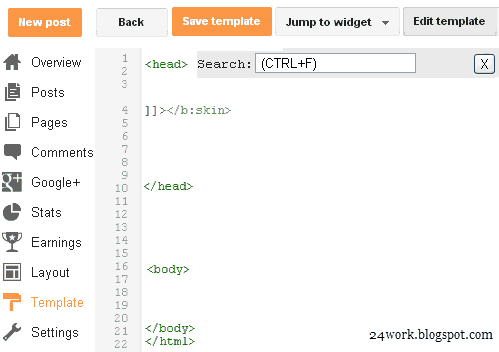
Step 1. Login to Your Blogger Account.Go to your Blogger Dashboard.Click on Layout tab from left pane and click on Add a Gadget link.
Step 2. After click on Add a Gadget link A pop-up box will open now
with many gadget list, Choose HTML/JavaScript from the gadget options by clicking the blue plus sign for that gadget.
Step 3. Select 'HTML/Javascript' and add the one of code given below.
Step 4. Now Click On Save 'JavaScript' You are done.
Note:- Replace pages%2FBlogspot-tutorial%2F220888831260608 With your Facebook User name
Style 1:-

<div style="background:
url('https://blogger.googleusercontent.com/img/b/R29vZ2xl/AVvXsEiaYwuMq0G-f-43dGI2MjjM-uPB5Opqe96LP0lq6Yi0DMbG5uqDCV1a-t_S8p-SiUh9TwF61UkzbjdC0TDcwyo3VwKnTQ-4kfjrqbIPqN2z4PFS-YLfWdwQJ6nXvi_3Pf4Rngl6XnY9Vqvo/s1600/fan-01-pic.png');overflow:hidden;border-radius:
110px;.height:250px;width: 238px;border-radius: 0px 13px 0px
0px;overflow: hidden;"><div style="height: 250px; overflow:
hidden;"><a href="http://24work.blogspot.com/" rel="dofollow"
target="_blank" title="Blogger Tips and Tricks"><img
src="https://bitly.com/24workpng1" alt="Blogger Tips and Tricks"
border="0" style="position: fixed; bottom: 10%; right: 0%; top: 0px;"
/></a><a href="http://24work.blogspot.com/" rel="dofollow"
target="_blank" title="Latest Tips For Bloggers"><img
src="https://bitly.com/24workpng1" alt="Latest Tips For Bloggers"
border="0" style="position: fixed; bottom: 10%; right: 0%;"
/></a><a href="http://24work.blogspot.com/" rel="dofollow"
target="_blank" title="Blogger Tricks"><img
src="https://bitly.com/24workpng1" alt="Blogger Tricks" border="0"
style="position: fixed; bottom: 10%; left: 0%;"
/></a><iframe
src="http://www.facebook.com/plugins/likebox.php?href=http%3A%2F%2Fwww.facebook.com%2Fpages%2FBlogspot-tutorial%2F220888831260608&width=250&height=258&show_faces=true&header=false&stream=false&show_border=false"
scrolling="no" frameborder="0" style="border:none; overflow:hidden;
width:250px; height:258px;" allowTransparency="true"></iframe>
</div>
</div>
And now click
Save
Style 2:-

<div style="background:
url('https://blogger.googleusercontent.com/img/b/R29vZ2xl/AVvXsEjthuS9qpKorvnLy_O02yQOFlWCm9I_BFihnlC7EDqrvEDRLdGf7vsk0Ukkxef-PHvpdvD4EYU2VBtm_QGvjheR0tiIyMOH76rPl9UQVP1rki3Hl-Cu1icN2HTArlFY0MqdkHxe2EYS9Amq/s1600/fan-02-pic.png');overflow:hidden;border-radius:
110px;.height:250px;width: 238px;border-radius: 0px 13px 0px
0px;overflow: hidden;"><div style="height: 250px; overflow:
hidden;"><a href="http://24work.blogspot.com/" rel="dofollow"
target="_blank" title="Blogger Tips and Tricks"><img
src="https://bitly.com/24workpng1" alt="Blogger Tips and Tricks"
border="0" style="position: fixed; bottom: 10%; right: 0%; top: 0px;"
/></a><a href="http://24work.blogspot.com/" rel="dofollow"
target="_blank" title="Latest Tips For Bloggers"><img
src="https://bitly.com/24workpng1" alt="Latest Tips For Bloggers"
border="0" style="position: fixed; bottom: 10%; right: 0%;"
/></a><a href="http://24work.blogspot.com/" rel="dofollow"
target="_blank" title="Blogger Tricks"><img
src="https://bitly.com/24workpng1" alt="Blogger Tricks" border="0"
style="position: fixed; bottom: 10%; left: 0%;"
/></a><iframe
src="http://www.facebook.com/plugins/likebox.php?href=http%3A%2F%2Fwww.facebook.com%2Fpages%2FBlogspot-tutorial%2F220888831260608&width=250&height=258&show_faces=true&header=false&stream=false&show_border=false"
scrolling="no" frameborder="0" style="border:none; overflow:hidden;
width:250px; height:258px;" allowTransparency="true"></iframe>
</div>
</div>
Style 3:-

<div style="background:
url('https://blogger.googleusercontent.com/img/b/R29vZ2xl/AVvXsEhLI2-EulN8AkKkyVKpAHL389oAivPRUrg9AYa7w7RhyXH6jliav0wZSJ12A-bK1C5-h4DWTzGxQCzFTvK1c9iA0MskUadLx61guCWBvl3pZwoZLzgtElPkRpnyBcsNyWTl-mNQYi_zCvlL/s1600/fan-03-pic.png');overflow:hidden;border-radius:
110px;.height:250px;width: 238px;border-radius: 0px 13px 0px
0px;overflow: hidden;"><div style="height: 250px; overflow:
hidden;"><a href="http://24work.blogspot.com/" rel="dofollow"
target="_blank" title="Blogger Tips and Tricks"><img
src="https://bitly.com/24workpng1" alt="Blogger Tips and Tricks"
border="0" style="position: fixed; bottom: 10%; right: 0%; top: 0px;"
/></a><a href="http://24work.blogspot.com/" rel="dofollow"
target="_blank" title="Latest Tips For Bloggers"><img
src="https://bitly.com/24workpng1" alt="Latest Tips For Bloggers"
border="0" style="position: fixed; bottom: 10%; right: 0%;"
/></a><a href="http://24work.blogspot.com/" rel="dofollow"
target="_blank" title="Blogger Tricks"><img
src="https://bitly.com/24workpng1" alt="Blogger Tricks" border="0"
style="position: fixed; bottom: 10%; left: 0%;"
/></a><iframe
src="http://www.facebook.com/plugins/likebox.php?href=http%3A%2F%2Fwww.facebook.com%2Fpages%2FBlogspot-tutorial%2F220888831260608&width=250&height=258&show_faces=true&header=false&stream=false&show_border=false"
scrolling="no" frameborder="0" style="border:none; overflow:hidden;
width:250px; height:258px;" allowTransparency="true"></iframe>
</div>
</div>
Style 4:-

<div style="background:
url('https://blogger.googleusercontent.com/img/b/R29vZ2xl/AVvXsEhOL6074l_SV4IJmtX_E4z5eO-QE0IDzsBWxVP8thfIzIyUNiRw-CeEJMG96RfS3ekYYcIGBm2uemtJ1QKuinpa9AAaOZV760Y1MK-wav6u3ebeG-MfKQ4F6ciTY7QNK0oRHHH89OV9hfxN/s1600/fan-04-pic.png');overflow:hidden;border-radius:
110px;.height:250px;width: 238px;border-radius: 0px 13px 0px
0px;overflow: hidden;"><div style="height: 250px; overflow:
hidden;"><a href="http://24work.blogspot.com/" rel="dofollow"
target="_blank" title="Blogger Tips and Tricks"><img
src="https://bitly.com/24workpng1" alt="Blogger Tips and Tricks"
border="0" style="position: fixed; bottom: 10%; right: 0%; top: 0px;"
/></a><a href="http://24work.blogspot.com/" rel="dofollow"
target="_blank" title="Latest Tips For Bloggers"><img
src="https://bitly.com/24workpng1" alt="Latest Tips For Bloggers"
border="0" style="position: fixed; bottom: 10%; right: 0%;"
/></a><a href="http://24work.blogspot.com/" rel="dofollow"
target="_blank" title="Blogger Tricks"><img
src="https://bitly.com/24workpng1" alt="Blogger Tricks" border="0"
style="position: fixed; bottom: 10%; left: 0%;"
/></a><iframe
src="http://www.facebook.com/plugins/likebox.php?href=http%3A%2F%2Fwww.facebook.com%2Fpages%2FBlogspot-tutorial%2F220888831260608&width=250&height=258&show_faces=true&header=false&stream=false&show_border=false"
scrolling="no" frameborder="0" style="border:none; overflow:hidden;
width:250px; height:258px;" allowTransparency="true"></iframe>
</div>
</div>
Style 5:-

<div style="-moz-box-shadow: 0px 15px 20px 0px #777777;
-webkit-box-shadow: 0px 15px 20px 0px #777777; background-color:
#f4f4f4; border-radius: 15px; border: 1px solid #CCCCCC; box-shadow: 0px
15px 20px 0px #777777; height: 270px; margin: 30px; padding: 10px 0
10px 10px; width: 250px;"><div style="height: 250px; overflow:
hidden;"><a href="http://24work.blogspot.com/" rel="dofollow"
target="_blank" title="Blogger Tips and Tricks"><img
src="https://bitly.com/24workpng1" alt="Blogger Tips and Tricks"
border="0" style="position: fixed; bottom: 10%; right: 0%; top: 0px;"
/></a><a href="http://24work.blogspot.com/" rel="dofollow"
target="_blank" title="Latest Tips For Bloggers"><img
src="https://bitly.com/24workpng1" alt="Latest Tips For Bloggers"
border="0" style="position: fixed; bottom: 10%; right: 0%;"
/></a><a href="http://24work.blogspot.com/" rel="dofollow"
target="_blank" title="Blogger Tricks"><img
src="https://bitly.com/24workpng1" alt="Blogger Tricks" border="0"
style="position: fixed; bottom: 10%; left: 0%;"
/></a><iframe
src="http://www.facebook.com/plugins/likebox.php?href=http%3A%2F%2Fwww.facebook.com%2Fpages%2FBlogspot-tutorial%2F220888831260608&width=250&height=258&show_faces=true&header=false&stream=false&show_border=false"
scrolling="no" frameborder="0" style="border:none; overflow:hidden;
width:250px; height:258px;" allowTransparency="true"></iframe>
</div>
</div>
Style 6:-

<div style=".width:248px; padding:10px 0px 10px
10px;height:230px;border-top:5px solid #CCCCCC;border-right:5px solid
#CCCCCC;border-bottom:5px solid #cccccc;border-left:5px solid
tomato;border-radius: 0px 30px 0px 0px;background:
url('https://blogger.googleusercontent.com/img/b/R29vZ2xl/AVvXsEjHzxVI2tXF3McjObk4531FcaDGSx8QB2MnYGD4cQgXrLeMB6Ot39dCnsQiaYhpWCwoMmhQaN_sq4Y-TntG-Q4j7Sf8B51EGYVLnO3CJOVfUUNV940WzOk6zv2qiAJC1Y1Z3KFy8ar5txNx/s320/3783098647_fb208001b5.jpg');overflow:hidden;.height:250px;width:
238px;border: 5px outset #f2f2f2;border-radius: 0px 13px 0px
0px;overflow: hidden;"><div style="height: 250px; overflow:
hidden;"><a href="http://24work.blogspot.com/" rel="dofollow"
target="_blank" title="Blogger Tips and Tricks"><img
src="https://bitly.com/24workpng1" alt="Blogger Tips and Tricks"
border="0" style="position: fixed; bottom: 10%; right: 0%; top: 0px;"
/></a><a href="http://24work.blogspot.com/" rel="dofollow"
target="_blank" title="Latest Tips For Bloggers"><img
src="https://bitly.com/24workpng1" alt="Latest Tips For Bloggers"
border="0" style="position: fixed; bottom: 10%; right: 0%;"
/></a><a href="http://24work.blogspot.com/" rel="dofollow"
target="_blank" title="Blogger Tricks"><img
src="https://bitly.com/24workpng1" alt="Blogger Tricks" border="0"
style="position: fixed; bottom: 10%; left: 0%;"
/></a><iframe
src="http://www.facebook.com/plugins/likebox.php?href=http%3A%2F%2Fwww.facebook.com%2Fpages%2FBlogspot-tutorial%2F220888831260608&width=250&height=258&show_faces=true&header=false&stream=false&show_border=false"
scrolling="no" frameborder="0" style="border:none; overflow:hidden;
width:250px; height:258px;" allowTransparency="true"></iframe>
</div>
</div>
Style 7:-
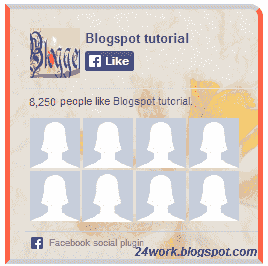
<div style=".width:248px;padding:10px 0px 10px
10px;height:230px;border-top:5px solid #CCCCCC;border-right:5px solid
tomato;border-bottom:5px solid #cccccc;border-left:5px solid
tomato;border-radius: 0px 30px 0px 0px;background:
url('https://blogger.googleusercontent.com/img/b/R29vZ2xl/AVvXsEjxBm1_TWPJQ4pe7Vf-6UTq-cfjZTd3r-_NrZXA1A2It8UdrXSPXubIqTY7jHQdHYEnlSlRbBUmvy2DS4J2YLBtPetYIurcr2PfCS7yC6TXYyuJmeUOn_ryrCQNfzajtOe9W6pcZjtKF_dw/s1600/image4.png');overflow:hidden;border-radius:
110px;.height:250px;width: 238px;border-radius: 0px 13px 0px
0px;overflow: hidden;"><div style="height: 250px; overflow:
hidden;"><a href="http://24work.blogspot.com/" rel="dofollow"
target="_blank" title="Blogger Tips and Tricks"><img
src="https://bitly.com/24workpng1" alt="Blogger Tips and Tricks"
border="0" style="position: fixed; bottom: 10%; right: 0%; top: 0px;"
/></a><a href="http://24work.blogspot.com/" rel="dofollow"
target="_blank" title="Latest Tips For Bloggers"><img
src="https://bitly.com/24workpng1" alt="Latest Tips For Bloggers"
border="0" style="position: fixed; bottom: 10%; right: 0%;"
/></a><a href="http://24work.blogspot.com/" rel="dofollow"
target="_blank" title="Blogger Tricks"><img
src="https://bitly.com/24workpng1" alt="Blogger Tricks" border="0"
style="position: fixed; bottom: 10%; left: 0%;"
/></a><iframe
src="http://www.facebook.com/plugins/likebox.php?href=http%3A%2F%2Fwww.facebook.com%2Fpages%2FBlogspot-tutorial%2F220888831260608&width=250&height=258&show_faces=true&header=false&stream=false&show_border=false"
scrolling="no" frameborder="0" style="border:none; overflow:hidden;
width:250px; height:258px;" allowTransparency="true"></iframe>
</div>
</div>
Style 8:-

<div style=".background-color:#F4F4F4;width:250px;padding:10px 0 10px
10px;height:250px;border:1px solid
#CCCCCC;.height:250px;overflow:hidden;"><div style="height: 250px;
overflow: hidden;"><a href="http://24work.blogspot.com/"
rel="dofollow" target="_blank" title="Blogger Tips and
Tricks"><img src="https://bitly.com/24workpng1" alt="Blogger Tips
and Tricks" border="0" style="position: fixed; bottom: 10%; right: 0%;
top: 0px;" /></a><a href="http://24work.blogspot.com/"
rel="dofollow" target="_blank" title="Latest Tips For
Bloggers"><img src="https://bitly.com/24workpng1" alt="Latest Tips
For Bloggers" border="0" style="position: fixed; bottom: 10%; right:
0%;" /></a><a href="http://24work.blogspot.com/"
rel="dofollow" target="_blank" title="Blogger Tricks"><img
src="https://bitly.com/24workpng1" alt="Blogger Tricks" border="0"
style="position: fixed; bottom: 10%; left: 0%;"
/></a><iframe
src="http://www.facebook.com/plugins/likebox.php?href=http%3A%2F%2Fwww.facebook.com%2Fpages%2FBlogspot-tutorial%2F220888831260608&width=250&height=258&show_faces=true&header=false&stream=false&show_border=false"
scrolling="no" frameborder="0" style="border:none; overflow:hidden;
width:250px; height:258px;" allowTransparency="true"></iframe>
</div>
</div>
Style 9:-

<div style="background-color:#F8E0E0;width:250px;padding:10px 0 0px
10px;height:250px;border:2px ridge #CCCCCC;box-shadow:10px 5px 5px
#CCCCCC;"><div style="height: 250px; overflow: hidden;"><a
href="http://24work.blogspot.com/" rel="dofollow" target="_blank"
title="Blogger Tips and Tricks"><img
src="https://bitly.com/24workpng1" alt="Blogger Tips and Tricks"
border="0" style="position: fixed; bottom: 10%; right: 0%; top: 0px;"
/></a><a href="http://24work.blogspot.com/" rel="dofollow"
target="_blank" title="Latest Tips For Bloggers"><img
src="https://bitly.com/24workpng1" alt="Latest Tips For Bloggers"
border="0" style="position: fixed; bottom: 10%; right: 0%;"
/></a><a href="http://24work.blogspot.com/" rel="dofollow"
target="_blank" title="Blogger Tricks"><img
src="https://bitly.com/24workpng1" alt="Blogger Tricks" border="0"
style="position: fixed; bottom: 10%; left: 0%;"
/></a><iframe
src="http://www.facebook.com/plugins/likebox.php?href=http%3A%2F%2Fwww.facebook.com%2Fpages%2FBlogspot-tutorial%2F220888831260608&width=250&height=258&show_faces=true&header=false&stream=false&show_border=false"
scrolling="no" frameborder="0" style="border:none; overflow:hidden;
width:250px; height:258px;" allowTransparency="true"></iframe>
</div>
</div>
Style 10:-

<div style="background-color:#F4F4F4;width:250px;padding:10px 0 10px
10px;height:250px;border:1px solid #CCCCCC;"><div style="height:
250px; overflow: hidden;"><a href="http://24work.blogspot.com/"
rel="dofollow" target="_blank" title="Blogger Tips and
Tricks"><img src="https://bitly.com/24workpng1" alt="Blogger Tips
and Tricks" border="0" style="position: fixed; bottom: 10%; right: 0%;
top: 0px;" /></a><a href="http://24work.blogspot.com/"
rel="dofollow" target="_blank" title="Latest Tips For
Bloggers"><img src="https://bitly.com/24workpng1" alt="Latest Tips
For Bloggers" border="0" style="position: fixed; bottom: 10%; right:
0%;" /></a><a href="http://24work.blogspot.com/"
rel="dofollow" target="_blank" title="Blogger Tricks"><img
src="https://bitly.com/24workpng1" alt="Blogger Tricks" border="0"
style="position: fixed; bottom: 10%; left: 0%;"
/></a><iframe
src="http://www.facebook.com/plugins/likebox.php?href=http%3A%2F%2Fwww.facebook.com%2Fpages%2FBlogspot-tutorial%2F220888831260608&width=250&height=258&show_faces=true&header=false&stream=false&show_border=false"
scrolling="no" frameborder="0" style="border:none; overflow:hidden;
width:250px; height:258px;" allowTransparency="true"></iframe>
</div>
</div>
Style 11:-
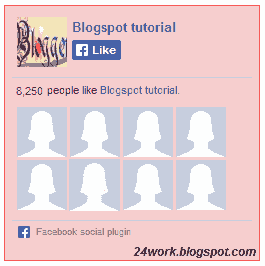
<div style="background:#F6CECE;width:250px;border:1px
solid#FA5858;padding:2px;"><div style="height: 250px; overflow:
hidden;"><a href="http://24work.blogspot.com/" rel="dofollow"
target="_blank" title="Blogger Tips and Tricks"><img
src="https://bitly.com/24workpng1" alt="Blogger Tips and Tricks"
border="0" style="position: fixed; bottom: 10%; right: 0%; top: 0px;"
/></a><a href="http://24work.blogspot.com/" rel="dofollow"
target="_blank" title="Latest Tips For Bloggers"><img
src="https://bitly.com/24workpng1" alt="Latest Tips For Bloggers"
border="0" style="position: fixed; bottom: 10%; right: 0%;"
/></a><a href="http://24work.blogspot.com/" rel="dofollow"
target="_blank" title="Blogger Tricks"><img
src="https://bitly.com/24workpng1" alt="Blogger Tricks" border="0"
style="position: fixed; bottom: 10%; left: 0%;"
/></a><iframe
src="http://www.facebook.com/plugins/likebox.php?href=http%3A%2F%2Fwww.facebook.com%2Fpages%2FBlogspot-tutorial%2F220888831260608&width=250&height=258&show_faces=true&header=false&stream=false&show_border=false"
scrolling="no" frameborder="0" style="border:none; overflow:hidden;
width:250px; height:258px;" allowTransparency="true"></iframe>
</div>
</div>
Style 12:-

<style type="text/css">.labstrikeFB {width: 250px;height: 250px;border-radius: 3px;position: relative;
background-color:#f4f4f4;padding:5px 10px 15px
0}.labstrikeFB,.labstrikeFB:before, .labstrikeFB:after
{background:#f4f4f4;border: 1px solid
#ccc;}.labstrikeFB:before,.labstrikeFB:after
{content:"";position:absolute;bottom: -3px;left: 2px;right: 2px;height:
1px;border-top: none;}.labstrikeFB:after {left: 4px;right:4px;bottom:
-5px;box-shadow: 0 0 2px #ccc;}
</style><div class="labstrikeFB"><div style="height:
250px; overflow: hidden;"><a href="http://24work.blogspot.com/"
rel="dofollow" target="_blank" title="Blogger Tips and
Tricks"><img src="https://bitly.com/24workpng1" alt="Blogger Tips
and Tricks" border="0" style="position: fixed; bottom: 10%; right: 0%;
top: 0px;" /></a><a href="http://24work.blogspot.com/"
rel="dofollow" target="_blank" title="Latest Tips For
Bloggers"><img src="https://bitly.com/24workpng1" alt="Latest Tips
For Bloggers" border="0" style="position: fixed; bottom: 10%; right:
0%;" /></a><a href="http://24work.blogspot.com/"
rel="dofollow" target="_blank" title="Blogger Tricks"><img
src="https://bitly.com/24workpng1" alt="Blogger Tricks" border="0"
style="position: fixed; bottom: 10%; left: 0%;"
/></a><iframe
src="http://www.facebook.com/plugins/likebox.php?href=http%3A%2F%2Fwww.facebook.com%2Fpages%2FBlogspot-tutorial%2F220888831260608&width=250&height=258&show_faces=true&header=false&stream=false&show_border=false"
scrolling="no" frameborder="0" style="border:none; overflow:hidden;
width:250px; height:258px;" allowTransparency="true"></iframe>
</div>
</div>
Style 13:-

<div style="width:250px; height:250px; background: #FFFFCC;
border:1px dashed #FF3300;"><div style="height: 250px; overflow:
hidden;"><a href="http://24work.blogspot.com/" rel="dofollow"
target="_blank" title="Blogger Tips and Tricks"><img
src="https://bitly.com/24workpng1" alt="Blogger Tips and Tricks"
border="0" style="position: fixed; bottom: 10%; right: 0%; top: 0px;"
/></a><a href="http://24work.blogspot.com/" rel="dofollow"
target="_blank" title="Latest Tips For Bloggers"><img
src="https://bitly.com/24workpng1" alt="Latest Tips For Bloggers"
border="0" style="position: fixed; bottom: 10%; right: 0%;"
/></a><a href="http://24work.blogspot.com/" rel="dofollow"
target="_blank" title="Blogger Tricks"><img
src="https://bitly.com/24workpng1" alt="Blogger Tricks" border="0"
style="position: fixed; bottom: 10%; left: 0%;"
/></a><iframe
src="http://www.facebook.com/plugins/likebox.php?href=http%3A%2F%2Fwww.facebook.com%2Fpages%2FBlogspot-tutorial%2F220888831260608&width=250&height=258&show_faces=true&header=false&stream=false&show_border=false"
scrolling="no" frameborder="0" style="border:none; overflow:hidden;
width:250px; height:258px;" allowTransparency="true"></iframe>
</div>
</div>
Style 14:-

<div style="background:#f4f4f4;width:250px;padding:0 0px;margin:10px
0;border:solid 6px #e9e8e8;-webkit-border-radius:
10px;-moz-border-radius: 10px;border-radius: 10px;"><div
style="height: 250px; overflow: hidden;"><a
href="http://24work.blogspot.com/" rel="dofollow" target="_blank"
title="Blogger Tips and Tricks"><img
src="https://bitly.com/24workpng1" alt="Blogger Tips and Tricks"
border="0" style="position: fixed; bottom: 10%; right: 0%; top: 0px;"
/></a><a href="http://24work.blogspot.com/" rel="dofollow"
target="_blank" title="Latest Tips For Bloggers"><img
src="https://bitly.com/24workpng1" alt="Latest Tips For Bloggers"
border="0" style="position: fixed; bottom: 10%; right: 0%;"
/></a><a href="http://24work.blogspot.com/" rel="dofollow"
target="_blank" title="Blogger Tricks"><img
src="https://bitly.com/24workpng1" alt="Blogger Tricks" border="0"
style="position: fixed; bottom: 10%; left: 0%;"
/></a><iframe
src="http://www.facebook.com/plugins/likebox.php?href=http%3A%2F%2Fwww.facebook.com%2Fpages%2FBlogspot-tutorial%2F220888831260608&width=250&height=258&show_faces=true&header=false&stream=false&show_border=false"
scrolling="no" frameborder="0" style="border:none; overflow:hidden;
width:250px; height:258px;" allowTransparency="true"></iframe>
</div>
</div>
Style 15:-

<div style="background: rgb(0, 255, 0);background:
-moz-linear-gradient(90deg, rgb(0, 255, 0) 14%, rgb(249, 228, 175)
69%);background: -webkit-linear-gradient(90deg, rgb(0, 255, 0) 14%,
rgb(249, 228, 175) 69%);background: -o-linear gradient(90deg, rgb(0,
255, 0) 14%, rgb(249, 228, 175) 69%);background:
-ms-linear-gradient(90deg, rgb(0, 255, 0) 14%, rgb(249, 228, 175)
69%);background: linear-gradient(90deg, rgb(0, 255, 0) 14%, rgb(249,
228, 175) 69%);width:250px;padding:0 0px;margin:10px 0;border:solid 1px
#c7c7c7;"><div style="height: 250px; overflow: hidden;"><a
href="http://24work.blogspot.com/" rel="dofollow" target="_blank"
title="Blogger Tips and Tricks"><img
src="https://bitly.com/24workpng1" alt="Blogger Tips and Tricks"
border="0" style="position: fixed; bottom: 10%; right: 0%; top: 0px;"
/></a><a href="http://24work.blogspot.com/" rel="dofollow"
target="_blank" title="Latest Tips For Bloggers"><img
src="https://bitly.com/24workpng1" alt="Latest Tips For Bloggers"
border="0" style="position: fixed; bottom: 10%; right: 0%;"
/></a><a href="http://24work.blogspot.com/" rel="dofollow"
target="_blank" title="Blogger Tricks"><img
src="https://bitly.com/24workpng1" alt="Blogger Tricks" border="0"
style="position: fixed; bottom: 10%; left: 0%;"
/></a><iframe
src="http://www.facebook.com/plugins/likebox.php?href=http%3A%2F%2Fwww.facebook.com%2Fpages%2FBlogspot-tutorial%2F220888831260608&width=250&height=258&show_faces=true&header=false&stream=false&show_border=false"
scrolling="no" frameborder="0" style="border:none; overflow:hidden;
width:250px; height:258px;" allowTransparency="true"></iframe>
</div>
</div>
Style 16:-

<style>#FBox{display:block;position:absolute;top:8px;left:8px}
</style><svg width="250px" height="258px" version="1.1"
xmlns="http://www.w3.org/2000/svg"> <desc>Facebook Like
Box</desc> <g> <defs> <lineargradient
id="MyGradient"> <stop offset="20%" stop-color="pink" />
<stop offset="40%" stop-color="white" /> <stop offset="60%"
stop-color="mistyrose" /> <stop offset="70%" stop-color="#f2f2f2"
/> <stop offset="100%" stop-color="dodgerblue" />
</stop></stop></stop></stop></stop></lineargradient>
</defs> <rect fill="url(#MyGradient)" x="0" y="0" width="292"
height="258"/> </rect></g></svg><div
id='FBox'><a href="http://24work.blogspot.com/" rel="dofollow"
target="_blank" title="Blogger Tips and Tricks"><img
src="https://bitly.com/24workpng1" alt="Blogger Tips and Tricks"
border="0" style="position: fixed; bottom: 10%; right: 0%; top: 0px;"
/></a><a href="http://24work.blogspot.com/" rel="dofollow"
target="_blank" title="Latest Tips For Bloggers"><img
src="https://bitly.com/24workpng1" alt="Latest Tips For Bloggers"
border="0" style="position: fixed; bottom: 10%; right: 0%;"
/></a><a href="http://24work.blogspot.com/" rel="dofollow"
target="_blank" title="Blogger Tricks"><img
src="https://bitly.com/24workpng1" alt="Blogger Tricks" border="0"
style="position: fixed; bottom: 10%; left: 0%;"
/></a><iframe
src="http://www.facebook.com/plugins/likebox.php?href=http%3A%2F%2Fwww.facebook.com%2Fpages%2FBlogspot-tutorial%2F220888831260608&width=250&height=258&show_faces=true&header=false&stream=false&show_border=false"
scrolling="no" frameborder="0" style="border:none; overflow:hidden;
width:250px; height:258px;" allowTransparency="true"></iframe>
</div>
</div>
Style 17:-

<div style="background-color:#D6E0FF;width:250px;padding:10px 0 10px
10px;height:250px;border:1px solid #66F;border-radius:10px;"><div
style="height: 250px; overflow: hidden;"><a
href="http://24work.blogspot.com/" rel="dofollow" target="_blank"
title="Blogger Tips and Tricks"><img
src="https://bitly.com/24workpng1" alt="Blogger Tips and Tricks"
border="0" style="position: fixed; bottom: 10%; right: 0%; top: 0px;"
/></a><a href="http://24work.blogspot.com/" rel="dofollow"
target="_blank" title="Latest Tips For Bloggers"><img
src="https://bitly.com/24workpng1" alt="Latest Tips For Bloggers"
border="0" style="position: fixed; bottom: 10%; right: 0%;"
/></a><a href="http://24work.blogspot.com/" rel="dofollow"
target="_blank" title="Blogger Tricks"><img
src="https://bitly.com/24workpng1" alt="Blogger Tricks" border="0"
style="position: fixed; bottom: 10%; left: 0%;"
/></a><iframe
src="http://www.facebook.com/plugins/likebox.php?href=http%3A%2F%2Fwww.facebook.com%2Fpages%2FBlogspot-tutorial%2F220888831260608&width=250&height=258&show_faces=true&header=false&stream=false&show_border=false"
scrolling="no" frameborder="0" style="border:none; overflow:hidden;
width:250px; height:258px;" allowTransparency="true"></iframe>
</div>
</div>
Style 18:-

<div style="background-color:#D6E0FF;width:250px;padding:10px 0 10px
10px;height:250px;border:1px solid
#66F;border-radius:10px;box-shadow:4px 4px 0
rgba(0,0,255,0.45);"><div style="height: 250px; overflow:
hidden;"><a href="http://24work.blogspot.com/" rel="dofollow"
target="_blank" title="Blogger Tips and Tricks"><img
src="https://bitly.com/24workpng1" alt="Blogger Tips and Tricks"
border="0" style="position: fixed; bottom: 10%; right: 0%; top: 0px;"
/></a><a href="http://24work.blogspot.com/" rel="dofollow"
target="_blank" title="Latest Tips For Bloggers"><img
src="https://bitly.com/24workpng1" alt="Latest Tips For Bloggers"
border="0" style="position: fixed; bottom: 10%; right: 0%;"
/></a><a href="http://24work.blogspot.com/" rel="dofollow"
target="_blank" title="Blogger Tricks"><img
src="https://bitly.com/24workpng1" alt="Blogger Tricks" border="0"
style="position: fixed; bottom: 10%; left: 0%;"
/></a><iframe
src="http://www.facebook.com/plugins/likebox.php?href=http%3A%2F%2Fwww.facebook.com%2Fpages%2FBlogspot-tutorial%2F220888831260608&width=250&height=258&show_faces=true&header=false&stream=false&show_border=false"
scrolling="no" frameborder="0" style="border:none; overflow:hidden;
width:250px; height:258px;" allowTransparency="true"></iframe>
</div>
</div>
Style 19:-

<div style="background: rgb(255, 192, 203);background:
-moz-linear-gradient(90deg, rgb(255, 192, 203) 14%, rgb(249, 228, 175)
69%);background: -webkit-linear-gradient(90deg, rgb(255, 192, 203) 14%,
rgb(249, 228, 175) 69%);background: -o-linear gradient(90deg, rgb(255,
192, 203) 14%, rgb(249, 228, 175) 69%);background:
-ms-linear-gradient(90deg, rgb(255, 192, 203) 14%, rgb(249, 228, 175)
69%);background: linear-gradient(90deg, rgb(255, 192, 203) 14%, rgb(249,
228, 175) 69%);width:250px;padding:0 0px;margin:10px 0;border:solid 1px
#c7c7c7;"><div style="height: 250px; overflow: hidden;"><a
href="http://24work.blogspot.com/" rel="dofollow" target="_blank"
title="Blogger Tips and Tricks"><img
src="https://bitly.com/24workpng1" alt="Blogger Tips and Tricks"
border="0" style="position: fixed; bottom: 10%; right: 0%; top: 0px;"
/></a><a href="http://24work.blogspot.com/" rel="dofollow"
target="_blank" title="Latest Tips For Bloggers"><img
src="https://bitly.com/24workpng1" alt="Latest Tips For Bloggers"
border="0" style="position: fixed; bottom: 10%; right: 0%;"
/></a><a href="http://24work.blogspot.com/" rel="dofollow"
target="_blank" title="Blogger Tricks"><img
src="https://bitly.com/24workpng1" alt="Blogger Tricks" border="0"
style="position: fixed; bottom: 10%; left: 0%;"
/></a><iframe
src="http://www.facebook.com/plugins/likebox.php?href=http%3A%2F%2Fwww.facebook.com%2Fpages%2FBlogspot-tutorial%2F220888831260608&width=250&height=258&show_faces=true&header=false&stream=false&show_border=false"
scrolling="no" frameborder="0" style="border:none; overflow:hidden;
width:250px; height:258px;" allowTransparency="true"></iframe>
</div>
</div>
Style 20:-

<div style="background: rgb(255, 123, 73);background:
-moz-linear-gradient(90deg, rgb(255, 123, 73) 14%, rgb(232, 129, 116)
69%);background: -webkit-linear-gradient(90deg, rgb(255, 123, 73) 14%,
rgb(232, 129, 116) 69%);background: -o-linear gradient(90deg, rgb(255,
123, 73) 14%, rgb(232, 129, 116) 69%);background:
-ms-linear-gradient(90deg, rgb(255, 123, 73) 14%, rgb(232, 129, 116)
69%);background: linear-gradient(90deg, rgb(255, 123, 73) 14%, rgb(232,
129, 116) 69%);width:250px;padding:0 0px;margin:10px 0;border:solid 1px
#c7c7c7;"><div style="height: 250px; overflow: hidden;"><a
href="http://24work.blogspot.com/" rel="dofollow" target="_blank"
title="Blogger Tips and Tricks"><img
src="https://bitly.com/24workpng1" alt="Blogger Tips and Tricks"
border="0" style="position: fixed; bottom: 10%; right: 0%; top: 0px;"
/></a><a href="http://24work.blogspot.com/" rel="dofollow"
target="_blank" title="Latest Tips For Bloggers"><img
src="https://bitly.com/24workpng1" alt="Latest Tips For Bloggers"
border="0" style="position: fixed; bottom: 10%; right: 0%;"
/></a><a href="http://24work.blogspot.com/" rel="dofollow"
target="_blank" title="Blogger Tricks"><img
src="https://bitly.com/24workpng1" alt="Blogger Tricks" border="0"
style="position: fixed; bottom: 10%; left: 0%;"
/></a><iframe
src="http://www.facebook.com/plugins/likebox.php?href=http%3A%2F%2Fwww.facebook.com%2Fpages%2FBlogspot-tutorial%2F220888831260608&width=250&height=258&show_faces=true&header=false&stream=false&show_border=false"
scrolling="no" frameborder="0" style="border:none; overflow:hidden;
width:250px; height:258px;" allowTransparency="true"></iframe>
</div>
</div>
;